
Apache Airflow in Practice: When Does a Company Need Data Orchestration?
The Most Important Answer
Apache Airflow is a platform for defining, running, and monitoring processes made up of multiple interdependent tasks.
It is most commonly used to orchestrate data workflows: extracting information from source systems, loading it into a data lake or data warehouse, running transformations, performing quality checks, and publishing results to reports and applications.
Airflow is not, however, a data processing engine. It does not replace a data warehouse, Apache Spark, dbt, a message queue, or a streaming platform. Nor is it a magic box that takes in chaos and produces a mature data platform.
Its role is to coordinate work performed by other systems.
Adopting Airflow makes sense when a company needs:
- explicit dependencies between processes;
- controlled retries after failures;
- historical data reprocessing;
- centralized execution monitoring;
- process auditability;
- coordination across multiple independent systems.
If a company has three simple scripts that run once a day, and the biggest incident of the past year was an expired FTP password, Airflow may be unnecessary overhead.
The problem it solves should be larger than the cost of maintaining the platform itself. It is a simple rule, though surprisingly often discovered only after Kubernetes has been deployed.
Airflow Solves an Operational Problem, Not Just a Technical One
Companies rarely start out needing an orchestrator. They usually start with a few scripts.
The first fetches data from an API. The second loads files into storage. The third runs SQL transformations. The fourth refreshes a report. The fifth was created “temporarily” three years ago, and nobody knows who owns it.
Each can be run by cron or a scheduler provided by a cloud service. This model works as long as the processes are small, stable, and independent.
Later, one of the following usually happens:
- a transformation starts even though the data import has not finished;
- a failure in one system requires several downstream processes to be restarted manually;
- nobody knows whether a report contains complete data;
- reprocessing the previous month requires a special-purpose script;
- several teams overload the same database at once;
- logs are spread across five systems, two of which are “temporary”;
- the person who knew the task execution order happens to be on vacation.
In such an environment, the problem is not the lack of another script. The problem is the lack of a central execution model.
Airflow then becomes a control layer that answers these questions:
- What should run?
- In what order?
- Based on which data?
- What should happen after an error?
- How can the process be repeated safely?
- How can we tell which data has already been processed?
- Who should be woken up at 03:17, and is it really necessary?
Airflow as a Control Plane for Data Workflows
The best way to think about Airflow is as a control plane.
The platform stores workflow definitions, dependencies, execution statuses, and operational metadata. It then instructs the appropriate systems to perform specific operations.
An example workflow might look like this:
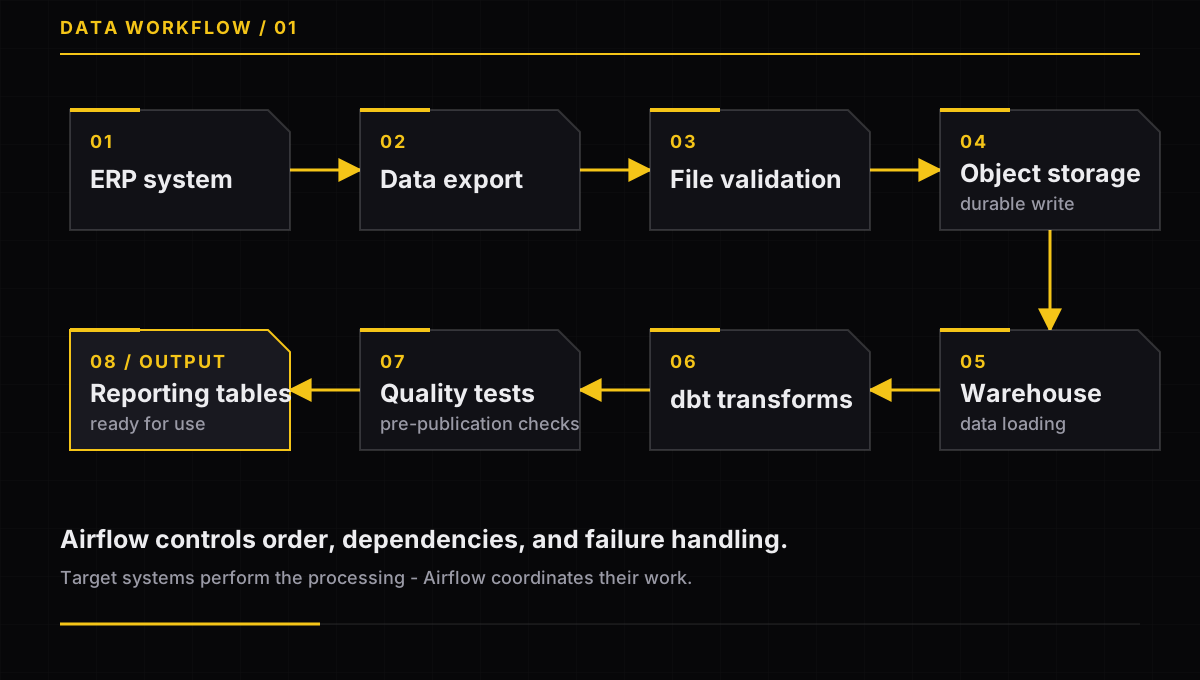
Airflow ensures that transformations do not start before the data has been loaded and that tables are not published before quality tests have completed.
In other words, it does exactly what we would expect from a sensible project coordinator, except it does not schedule additional meetings.
The heavy lifting happens outside Airflow itself:
- the data warehouse executes SQL queries;
- dbt models run on the database engine;
- Spark performs large-scale computations;
- object storage holds files;
- a specialized platform trains machine learning models;
- containers may run on Kubernetes.
This separation allows orchestration, storage, and compute to scale independently.
It also matters financially. Airflow should not move gigabytes of data between tasks merely because someone found a way to make it technically possible.
In data engineering, “can be done” and “should be done” are two separate sets that occasionally even overlap.
How Does Airflow Describe a Process?
Airflow’s fundamental organizational unit is a DAG, or Directed Acyclic Graph.
A DAG describes a process as a graph of tasks and the dependencies between them. Among other things, it defines:
- the tasks belonging to the process;
- execution order;
- the schedule or trigger condition;
- the number of retries;
- timeouts;
- what happens on success or failure;
- concurrency constraints.
“Acyclic” means that dependencies cannot form a closed loop.
Task A may precede task B, but task B cannot simultaneously be a condition for starting task A. This keeps the workflow executable instead of turning it into a graphical representation of the budget approval process in a large organization.
DAG code should describe how work is coordinated. It should not contain all of the process’s business logic.
Transformation rules, validators, and integrations are better placed in testable modules or separate applications. This allows them to evolve without treating every DAG like a monolith written by five generations of the data team.
Operator, Task, and Task Instance
An operator is a template for a particular type of operation. It may represent running a Python function, a SQL query, a system command, or a job in a container.
A task is an operator configured and placed in a specific DAG.
A task instance is a single execution of a task within a particular process run.
There may be only one task definition, but its instances will run repeatedly: every day, for every customer, for every partition, or while reprocessing historical data.
It is a little like an invoice template and a specific invoice. Except that with Airflow, issuing the same invoice again may be exactly the problem we are trying to avoid.
A Schedule Does Not Always Mean a Specific Time
Airflow is associated primarily with time-based schedules, but the modern platform can also start processes based on data and events.
A DAG can be triggered:
- at a specified time;
- after a particular data interval ends;
- after a specified asset is updated;
- through the API;
- as the result of an external event;
- manually by an operator.
The last option is particularly popular shortly after someone says, “But we didn’t change anything.”
Airflow can react when particular data appears or when an external system sends a signal. This does not turn the platform into a stream processor.
Every run still represents a bounded process with a beginning, an end, and an execution state.
If a company must respond to every event within milliseconds or seconds, it should use a streaming platform or a message queue.
Airflow can coordinate processes around such a system, but it should not sit directly in the path of every user click. Users can be impatient, and the scheduler has other interests.
Why Do Data Intervals and Backfills Matter?
In data workflows, the execution time is not always the same as the period covered by the data.
A process running at 01:00 on July 2 may process all data from July 1. Airflow describes this range as a data interval.
This makes it possible to answer one question deterministically:
What range of data should this run process?
This is critical during a backfill, which reprocesses missing or historical intervals.
For example, after fixing an error in financial logic, a company may reprocess every day from the previous quarter.
This is a good time to remember that a “small formula adjustment” can mean recalculating several billion records.
Airflow can create a separate run for each interval and limit the number of active processes. The backfill mechanism itself does not provide safety, however. Safety comes from designing tasks correctly.
The Most Important Property of a Production Task: Idempotency
An idempotent task can run again for the same data range without creating duplicates or corrupting the result.
This is one of the most important principles in designing Airflow workflows.
Suppose a task is meant to save sales data for July 1. The first execution writes half the records and then loses its database connection.
If the retry simply performs the INSERT operations again, some records may be written twice.
Sales rise by 40 percent, management is delighted, and the finance department somewhat less so.
A safer model may use:
- writes to a partition assigned to a specific day;
- a
MERGEor upsert operation; - unique business keys;
- a temporary result followed by atomic publication;
- a run identifier;
- deletion of an incomplete partition before retrying;
- a quality check before making data available to consumers.
A retry is an execution recovery mechanism. It is not a guarantee of data correctness.
Automatically repeating an incorrect operation does not solve the problem. It merely solves the lack-of-consistency problem.
What Should Pass Between Tasks?
Airflow tasks may run on different workers, machines, or in separate containers. They should not assume access to shared memory or a local file system.
Airflow provides XCom for exchanging small pieces of information.
XCom can pass:
- a file identifier;
- a path to an object in storage;
- the name of a created table;
- the number of a processed partition;
- a validation status;
- an external job identifier.
Large DataFrames, files, or entire datasets should not be passed through XCom.
XCom is a good place for the information:
The file is here.
It is not a good place for:
Here is the file, a copy of it, a DataFrame, and three million records just in case.
Larger results should be saved in durable data storage, while XCom can hold their address or identifier.
This keeps business data in a system designed to store it and prevents Airflow from turning its metadata database into a data warehouse that does not know it is a data warehouse.
What Does a Production Airflow Architecture Look Like?
A production Airflow deployment is not a single application. It consists of several cooperating components.
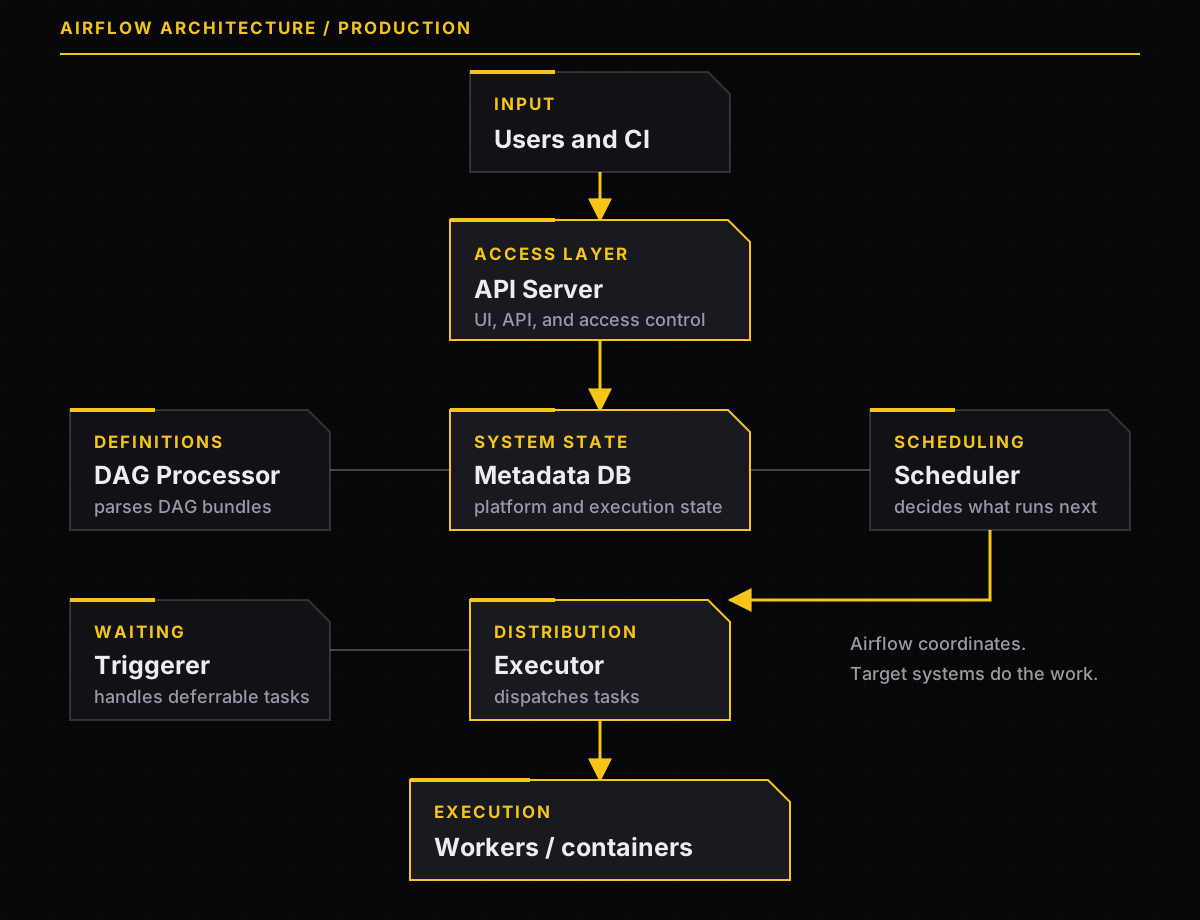
API Server
The API Server provides the user interface and API used to manage the platform.
This is where users check process statuses, trigger DAGs, and analyze failures.
In practice, the interface is often opened in two situations: during a management demo and five seconds after an alert arrives.
Scheduler
The scheduler analyzes workflow state and decides which task instances satisfy their trigger conditions. It then passes them to the executor.
The scheduler should not execute pipeline business logic.
Its job is to make sequencing decisions, not calculate margins, generate PDFs, and download the entire customer database during module import.
DAG Processor
The DAG Processor fetches and parses DAG definitions.
DAG code should be fast and deterministic. During import, it should not:
- query a production database;
- download files from the internet;
- call external APIs;
- load large datasets;
- perform a six-month financial reconciliation.
DAG definitions are parsed repeatedly. Every expensive operation performed during parsing may therefore be multiplied by the number of DAGs, processes, and successive attempts to understand why the scheduler cannot keep up.
Metadata Database
The metadata database stores Airflow state, including information about DAGs, runs, task instances, configuration, and operational history.
It should not be treated as a warehouse for business data.
In a production environment, it must be covered by:
- monitoring;
- backups;
- access control;
- a recovery plan;
- regular maintenance.
The metadata database is one of those components whose importance becomes obvious at the exact moment it stops working.
Executor and Workers
The executor determines how tasks are submitted for execution.
Tasks may run:
- locally;
- on distributed workers;
- in separate Kubernetes pods;
- in an environment managed by a cloud provider.
The executor should be selected based on requirements for:
- scale;
- isolation;
- cost;
- available expertise;
- workload characteristics.
KubernetesExecutor can provide strong isolation and flexibility. That does not mean every company should immediately build a Kubernetes platform just to run five SQL queries once a day.
Solving an orchestration problem by creating a larger infrastructure problem is not always a sign of architectural maturity.
Triggerer
The triggerer handles tasks that wait a long time for an external condition.
Examples include waiting for:
- a job in a cloud service to finish;
- a file to appear;
- a process in another system to complete;
- the state of an external resource to change.
A classic sensor may occupy a worker for the entire wait. A deferrable operator releases the worker and delegates the wait to the triggerer.
The difference is similar to assigning an employee to stare at an inbox all day versus asking them to come back when a message arrives.
Both models work. One is simply much more expensive.
How Does Airflow Protect Dependent Systems?
The ability to run many processes in parallel does not mean every target system can handle them.
During a backfill, Airflow may generate dozens or hundreds of runs. Without concurrency controls, they may simultaneously:
- send requests to the same API;
- perform expensive operations in the data warehouse;
- write to a single table;
- launch too many clusters;
- exceed an external provider’s limit;
- find out how quickly the security team can call the CTO.
Airflow uses pools to limit such situations.
A pool represents a limited set of slots assigned to a particular resource. A task using a heavily loaded API may occupy one slot, while a demanding database operation may occupy several.
Once capacity is exhausted, subsequent tasks remain queued.
Pools should be combined with:
- limits on active DAG runs;
- limits on parallel tasks;
- limits for a specific backfill;
- timeouts;
- a limited number of retries;
- exponential backoff;
- limits enforced by the target system.
The goal is not to maximize Airflow utilization.
The goal is to avoid a situation in which a recovery process causes a larger outage than the problem it was meant to fix.
Observability: Task Success Does Not Mean Business Success
The Airflow interface shows the state of DAGs, tasks, dependencies, and retries. It also allows users to inspect logs from individual executions.
That is not enough, however, to assess the quality of a data workflow.
Monitoring should cover three levels.
Platform Health
The following should be monitored:
- scheduler;
- DAG Processor;
- triggerer;
- API Server;
- metadata database;
- queue lengths;
- worker availability;
- DAG parsing time.
The information that “Airflow is running” is less useful if every task has been waiting in the queue for two hours.
Execution Health
At this level, the relevant metrics are:
- the number of failures and retries;
- queue wait time;
- task execution duration;
- the number of missed deadlines;
- backfill duration;
- tasks remaining in the running state for too long.
Data and Business Health
The most important questions are:
- Did the expected partition appear?
- Is the data volume within the normal range?
- Did the schema change without agreement?
- Is the data complete?
- Was the report published on time?
- Does the result reconcile with the financial system?
Airflow may execute every task correctly and still publish an empty table.
From the platform’s perspective, that is a green success. From the CFO’s perspective, it is more likely a topic for a meeting.
That is why a “task failed” alert should be supplemented by alerts concerning data freshness, completeness, and quality.
Security Is Part of Choosing an Executor
DAG and task code is executable code.
Someone who can publish DAGs can potentially run code in the Airflow environment.
The architecture decision should therefore not be limited to the question:
How many tasks do we want to run in parallel?
It should also establish:
- who can publish DAGs;
- where team code is executed;
- which credentials are available to a worker;
- whether tasks from different teams share an environment;
- whether separate container images are required;
- who can read Connections, Variables, and Secrets;
- whether a single deployment provides sufficient isolation.
Sharing one platform among multiple teams does not automatically imply complete isolation.
Just as a shared office kitchen does not mean everyone will have their own shelf, despite everyone initially claiming otherwise.
Secrets should not be stored in DAG code. Access to external systems should use controlled identity and credential management mechanisms.
The principle of least privilege is less impressive than an elaborate architecture diagram, but usually much more useful during an audit.
Managed Airflow or a Self-Hosted Deployment?
Managed Airflow reduces some infrastructure responsibilities, but it does not remove responsibility for data workflows.
The provider may maintain some platform components, while the customer team remains responsible for:
- DAG quality;
- Python dependencies;
- provider compatibility;
- integration security;
- roles and permissions;
- concurrency limits;
- workload execution costs;
- backfill procedures;
- data quality;
- response to process failures.
“Managed” does not mean “nobody on our side needs to know anything anymore.”
It means, rather, that some infrastructure problems now have a support ticket number with the provider.
A self-hosted deployment provides greater control over configuration, networking, and the task execution environment. In return, the organization assumes responsibility for:
- upgrades;
- the metadata database;
- scaling;
- availability;
- backups;
- monitoring;
- incident response.
The decision should be based on the operating model, not solely on infrastructure price.
The cheapest machine in a cloud calculator can become a very expensive solution once on-call duties, upgrades, and three weeks spent diagnosing a Python dependency conflict are included.
When Is Airflow the Right Choice?
Airflow is a good candidate when most of the following statements are true:
| Criterion | Why It Matters |
|---|---|
| The process spans several systems | Central coordination of dependencies is required |
| Data is processed in batches | Each run has a defined scope and result |
| Retries and backfills are required | The process must support controlled reprocessing |
| Task order matters | Individual stages depend on preceding ones |
| An execution audit trail is required | The process history must be reconstructable |
| Pipelines are developed like software | Definitions undergo review, testing, and CI/CD |
| Target systems have constraints | Pools and limits are required |
| Multiple teams use the data platform | Standards and ownership are required |
Typical use cases include:
- ELT workflows for data lakes and data warehouses;
- dbt transformations;
- financial reporting;
- reconciliation between systems;
- regulatory data publication;
- feature engineering for machine learning models;
- scheduled model training;
- document processing;
- controlled data migrations.
Airflow is particularly valuable where the question “did the process run?” requires a more precise answer than “probably, because the file is on the server.”
When Is Airflow Not the Best Choice?
Simple, Independent Jobs
If a company has three small scripts that do not depend on one another and almost never need to be rerun, cron or a native scheduler may be sufficient.
Not every screw needs a digital twin.
Jobs Triggered by a User Request
When an application accepts an HTTP request and must immediately dispatch background work, a task queue or messaging system is a better solution.
Airflow should not be part of the request’s critical path.
Stream Processing
When a system must process events continuously and respond with low latency, it needs a streaming engine.
Triggering a DAG for every Kafka event would be technically creative. Creativity, however, is not always a desirable property in a production system.
Application Process Orchestration
Microservice processes based on short steps, compensating actions, and immediate responses may be better suited to a state machine or a dedicated application orchestrator.
No Team to Maintain the Platform
Airflow is not a “set it and forget it” tool.
Without an owner, the following will appear over time:
- uncontrolled dependencies;
- outdated providers;
- unstable DAGs;
- unclear alerts;
- expensive backfills;
- capacity issues;
- unclear incident ownership.
Instead of a process orchestrator, the company then gets a problem orchestrator.
What Should a CTO Establish Before Adoption?
Responsibility Boundary
Airflow should control execution, but it should not be the place where large datasets and compute-intensive logic are stored.
Ownership Model
Every production DAG should have:
- a technical owner;
- a data or business process owner;
- an expected completion time;
- a failure-handling procedure;
- backfill rules;
- an escalation channel.
An owner field set to data-team is not an accountability model. It is the administrative equivalent of writing “someone will take care of it.”
Security Strategy
The organization must define who can deploy code, who manages secrets, and whether teams may share workers and execution environments.
Executor Strategy
The executor should match actual scale and isolation requirements.
The most complex option should not be selected solely because it looks good in a diagram.
Upgrade Cycle
Upgrades for Airflow, providers, and the Python environment must be planned.
Changes should be tested against representative DAGs before production deployment.
“Let’s upgrade on Friday afternoon; it should be fine” is not a formal upgrade strategy.
Observability
Deployment success should be measured by data quality and timeliness, not just by the availability of the Airflow interface.
Minimum Standard for a Production DAG
Before allowing a process into production, it is worth applying an unambiguous quality gate.
| Control Question | Requirement |
|---|---|
| Are tasks idempotent? | A retry does not create duplicates |
| Is the data scope explicit? | Every run has a defined interval |
| Does large data bypass XCom? | XCom contains metadata only |
| Are timeouts defined? | A task cannot run forever |
| Are retries limited? | A failure does not create an infinite cost loop |
| Are concurrency limits in place? | A backfill does not overload systems |
| Does the DAG have an owner and runbook? | It is clear who responds |
| Is data quality monitored? | Technical success is not enough |
| Is the DAG tested in CI? | Errors are caught before deployment |
| Does the code avoid I/O during parsing? | The platform remains stable |
| Are secrets kept out of code? | Credentials come from a controlled source |
| Has the backfill been tested? | The team understands its cost and impact |
If half the answers are “we’ll do it later,” it is safe to assume that “later” will arrive during the first incident.
How Should You Approach an Airflow Implementation?
The safest approach is not to start by migrating every process.
Stage 1: Select Two Pipelines
The first should be relatively simple but representative. The second should contain real dependencies, retries, and a need to reprocess historical data.
Do not start with the most important financial process merely because it will give the project “management visibility.” Visibility will also come during an outage.
Stage 2: Define Success Criteria
It is worth measuring:
- diagnosis time;
- data recovery time;
- the number of manual interventions;
- publication timeliness;
- the number of false alerts;
- infrastructure cost;
- change deployment time.
Stage 3: Test Failure Scenarios
A PoC should cover more than the happy path.
Test:
- source unavailability;
- a partially written result;
- an external job timeout;
- a task retry;
- a backfill across multiple intervals;
- an exceeded API limit;
- deployment of a new DAG version while runs are active.
A demo in which everything works mainly proves that the person preparing it knows the correct sequence of clicks.
The platform’s value becomes apparent only when something stops working.
Stage 4: Choose the Operating Model
Only after understanding the workload profile should the organization choose:
- a managed or self-hosted service;
- the executor;
- the isolation model;
- the DAG distribution method;
- the logging strategy;
- monitoring;
- the upgrade process.
Stage 5: Establish a Platform Standard
Before expanding adoption, shared patterns are needed:
- a repository template;
- naming conventions;
- required tags;
- a library of shared integrations;
- a retry policy;
- an alerting standard;
- a backfill procedure;
- a production checklist.
Without these rules, Airflow may merely move the chaos from scripts into a single, very polished interface.
Conclusions
Apache Airflow provides the most value where a data workflow must be repeatable, observable, and safe to reprocess.
It is not a compute engine, a data store, or a tool for processing every event in real time.
It is a control layer that coordinates the work of other systems.
For a CTO, the decision to adopt Airflow should not begin with the question:
Do we need a modern orchestrator?
A better question is:
Is the cost of manually managing dependencies, failures, backfills, and auditing now higher than the cost of maintaining an orchestration platform?
If the answer is yes, Airflow can become an important part of the data platform.
Success, however, requires more than simply running the software. It requires:
- idempotent tasks;
- concurrency controls;
- explicit ownership;
- secure execution environments;
- data observability;
- an upgrade process;
- a team responsible for the platform.
Only then does Airflow become a control plane for data.
Otherwise, it remains a highly advanced way to find out that the script has failed again.
Have a similar data problem?
If this resonates with your stack or migration, let’s talk.
Get in touch